
Stop Juggling Spreadsheets

The All-in-One Platform Built for Charter Boat Businesses
It's 5:30 AM. Captain Mike's alarm goes off, and before he even pours his first cup of coffee, he's already opening three different apps on his phone. He checks his spreadsheet for today's bookings, scrolls through text messages to confirm payment details, opens his email to respond to a new booking request, and pulls up his handwritten notebook to review customer preferences from last season.
Sound familiar?
If you run a fishing charter or boat tour business, you know this chaos all too well. Between managing customers, coordinating bookings, collecting payments, responding to reviews, and trying to market your business online, there simply aren't enough hours in the day. And when you're using disconnected tools—spreadsheets, paper notebooks, text messages, and multiple apps—critical details slip through the cracks.
Missed follow-ups mean lost revenue. Slow payment collection means cash flow problems. Unmonitored reviews mean damage to your reputation. And manual data entry? That's time you should be spending on the water with your customers, not stuck behind a desk.
There's a better way.
Introducing CharterSites Admin: The Command Center for Your Charter Business
CharterSites Admin is a comprehensive management platform built specifically for fishing charter and boat tour operators. Not adapted from some generic business software. Not a collection of disconnected tools forced to work together. This is a purpose-built system designed from day one to handle the unique challenges of running a charter business.
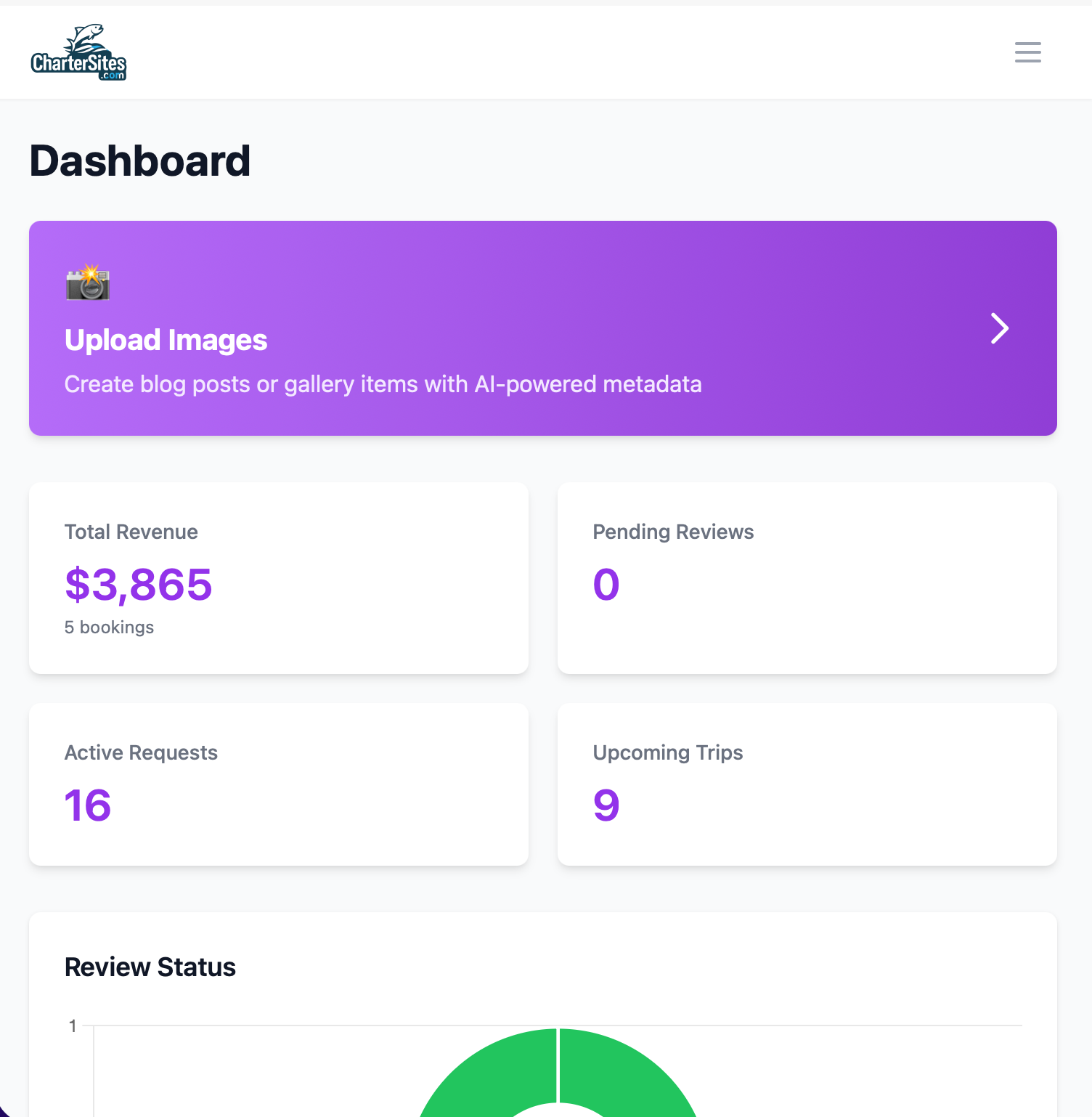
Everything in one place. One login. One dashboard. Complete visibility into your business operations.
Whether you're managing customer relationships, coordinating bookings, processing payments, moderating reviews, or tracking your business performance, CharterSites Admin centralizes it all into an intuitive platform that works as hard as you do.
Let's dive into what makes this platform different—and why charter operators like Charter Sites, Marathon Fishing Kings, and AGM Fishing Charters have made it their operational backbone.
Customer Relationship Management: Know Your Customers Like Never Before
Remember when Captain Mike could recall every customer's name, their favorite fishing spots, and whether they prefer morning or afternoon trips? When you're doing 10 trips a year, that's easy. But at 100+ trips with new customers every week, your memory becomes a liability.
The CharterSites CRM transforms scattered customer data into actionable intelligence.
What You Get
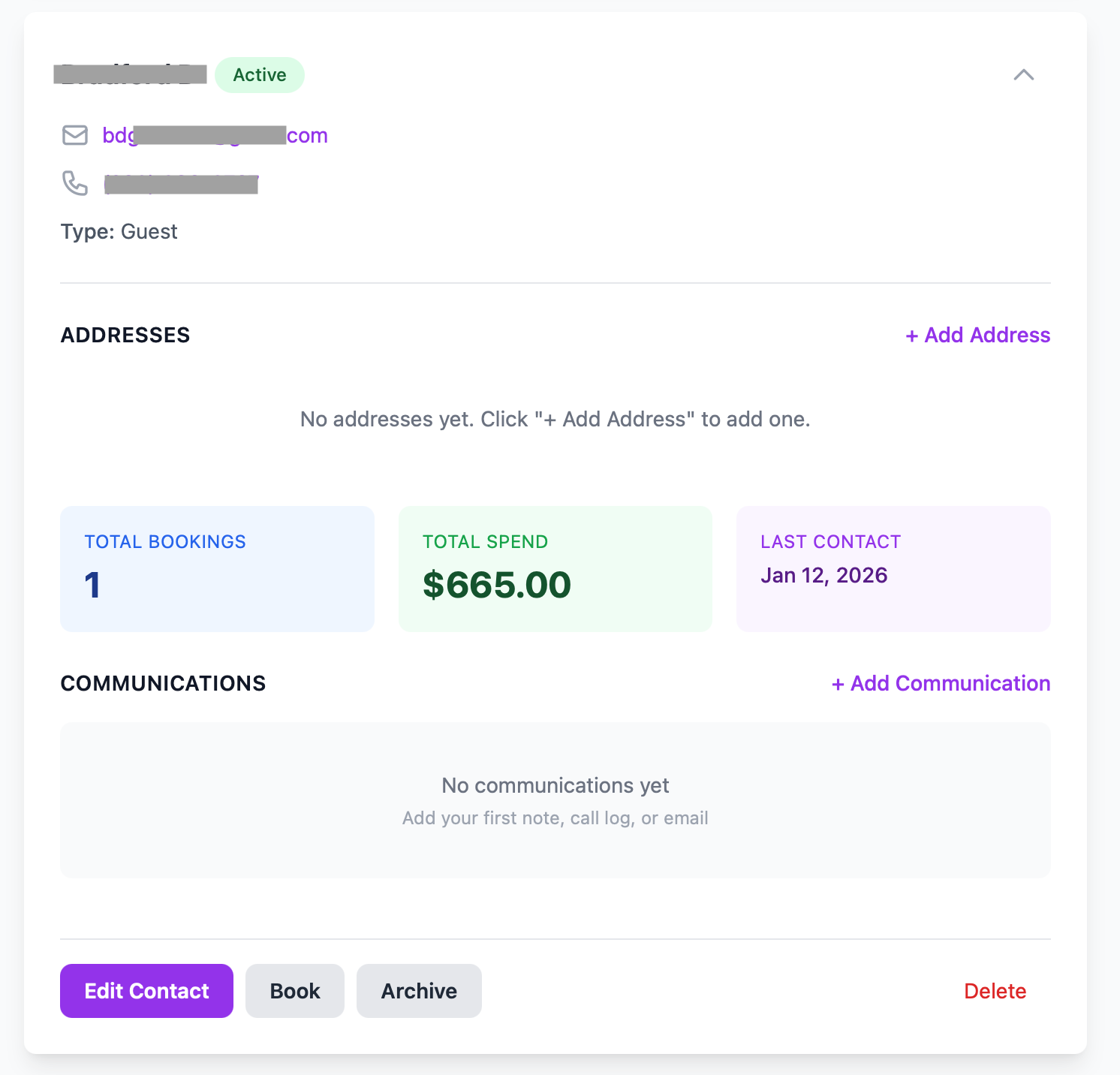
Complete Customer Profiles: Store everything about your customers in one place—names, contact information, booking history, communication notes, preferences, and custom tags for easy segmentation. Tag VIP customers, repeat clients, corporate groups, or bachelor parties. Find anyone instantly with powerful search and filtering.
Communication Timeline: Every email, call, text message, and note is logged chronologically. When Mrs. Johnson calls asking about her August booking, you'll have complete context at your fingertips—no more "let me check my notes and call you back."
Smart Duplicate Prevention: When a booking request comes in, the system automatically checks if the email address already exists in your database. No more accidentally creating three different records for the same customer. Clean data, every time.
Customer Segmentation with Tags: Create tags for any category you need—"Deep Sea Fishing," "Family Friendly," "Experienced Anglers," "Newsletter Subscribers." Filter your customer list by any combination of tags to send targeted promotions or track specific customer segments.
Real-World Scenario
It's March, and you're planning your spring promotion for tarpon season. In the old system, you'd manually review spreadsheets trying to remember who fished for tarpon last year. With CharterSites CRM, you filter by the "Tarpon" tag, exclude customers who already booked this spring, and instantly generate a list of 47 qualified leads. Five minutes versus five hours.
Or consider this: A customer calls asking if you have availability next week. Instead of shuffling through papers or multiple screens, you pull up their profile in two clicks. You see they've booked with you four times, always prefer morning trips, and mentioned their anniversary last time. You offer them your sunrise special with a complimentary champagne toast. That's not just good service—that's creating memorable experiences that turn customers into lifelong advocates.
Bottom line: Your CRM tracks every customer interaction, booking history, and preference. This means personalized service at scale, better customer retention, and more repeat bookings. Charter operators report that organized customer data directly translates to 20-30% more repeat business.
Smart Booking Management: Your Calendar, Perfected
Booking management is where most charter operations break down. Double bookings. Missed time slots. Forgotten details about guest count or special requests. Paper calendars crossed out with multiple revisions. Spreadsheets with color coding that only you understand.
CharterSites gives you two powerful booking views, seamlessly integrated with your CRM.
Dual View System
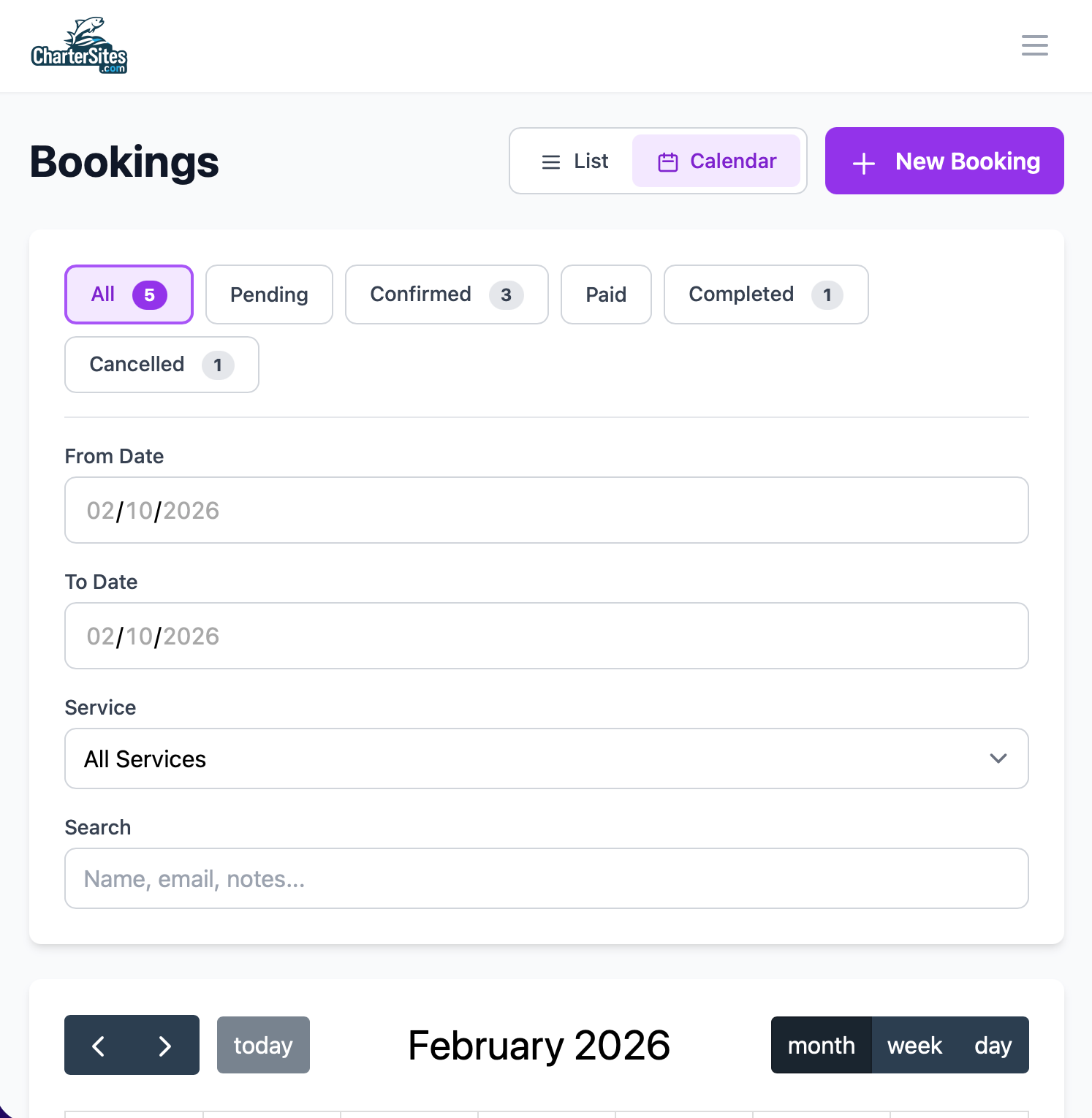
List View (Default): Perfect for mobile devices and quick scanning. See all your bookings as cards with key details visible at a glance—guest name, service type, date, time, payment status, and booking status. Filter by date range, service, status, or search by customer name. Works beautifully on your phone when you're at the dock.
Calendar View: Switch to a visual calendar layout powered by FullCalendar. See your entire month at a glance. Drag and drop bookings to reschedule. Click any date to create a new booking. Color-coded by status (pending, confirmed, paid, completed, cancelled). This is your command center for capacity planning.
Beyond Customer Bookings: Time Blocks
Not every calendar entry is a paying customer. You need to block time for boat maintenance, bad weather, personal time, holidays, or private events. CharterSites lets you create time blocks for any reason, ensuring those slots don't get accidentally booked.
Time block types include:
- Maintenance: Boat repairs, engine servicing, cleaning
- Weather: Hurricane preparations, unsafe conditions
- Holiday: Personal days off, family events
- Private Event: Company parties, exclusive charters
- Other: Any custom reason you need
Seamless CRM Integration
Here's where it gets powerful. When creating a booking, you can:
-
Link to existing CRM contact: Search by email, phone, or name. All their information pre-fills automatically. Their booking history is right there.
-
Create new CRM contact on the fly: Customer not in your system? Add them during the booking process. The system automatically checks for duplicates by email, preventing duplicate records.
-
Automatic data sync: Guest name, email, and phone are copied to the booking for quick reference, but the booking maintains its link to the full CRM profile.
Smart Service Management
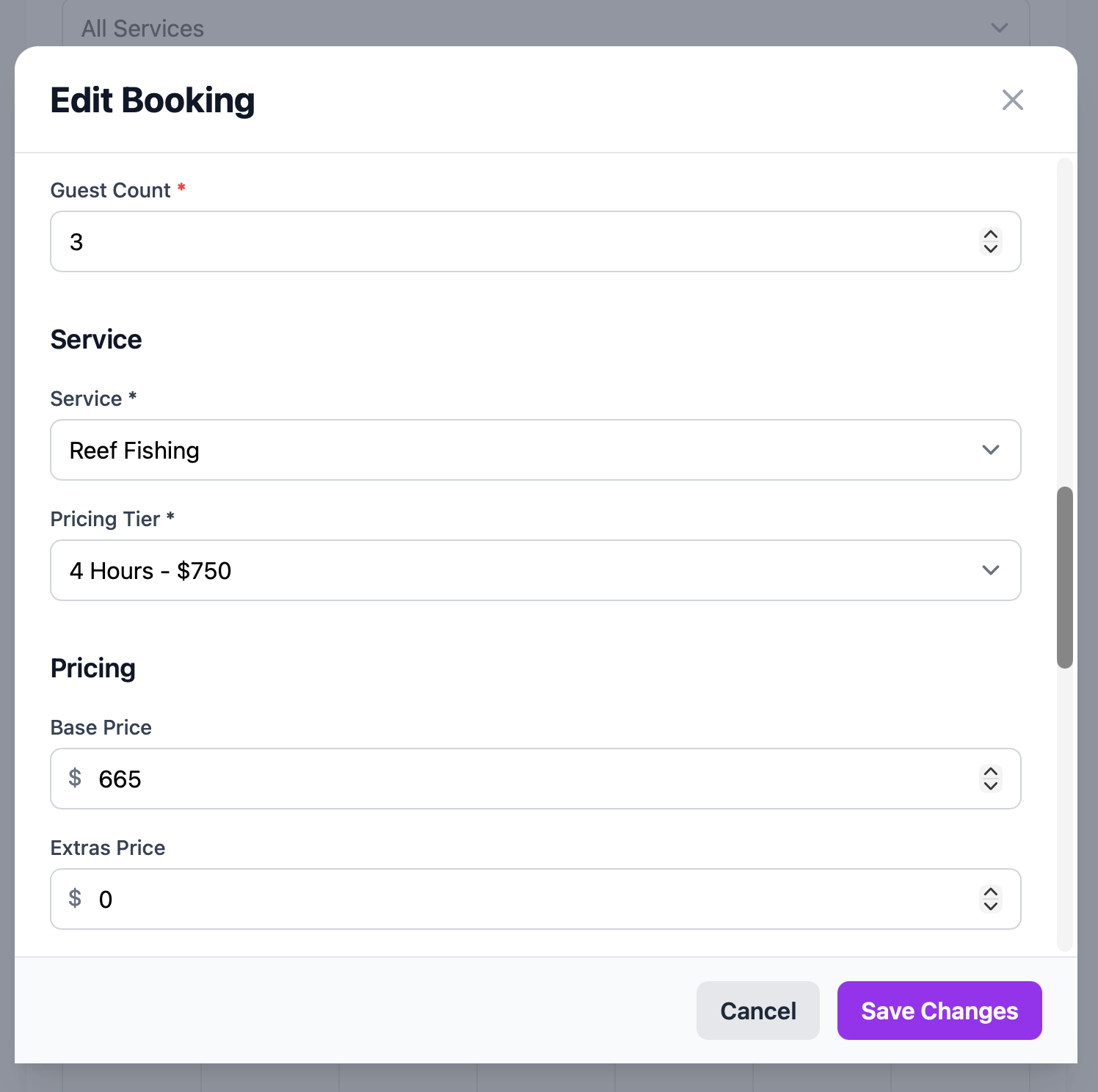
Link bookings to your service catalog (half-day reef fishing, full-day offshore, sunset cruise, etc.). Each service can have multiple pricing tiers—standard, premium, group rates. The system handles:
- Base pricing by service and tier
- Extra charges (additional guests, premium bait, special equipment)
- Discounts (returning customers, group discounts, seasonal promotions)
- Deposit amounts (fixed dollar or percentage)
- Duration and time slot management
Calendar Feed Integration
Modern convenience: Generate a unique ICS calendar feed URL that works with Google Calendar, Apple Calendar, or Outlook. Your confirmed and completed bookings automatically sync to your personal calendar. Share the feed with your crew so everyone sees the same schedule. Calendar apps refresh every 15-60 minutes, keeping everyone in sync.
Real-World Scenario
It's Tuesday afternoon. You're at the marina performing routine maintenance when your phone buzzes. A regular customer wants to book Saturday morning. You open CharterSites on your phone, switch to calendar view, and see Saturday morning is wide open. You tap the date, type the customer's name, their profile auto-fills with their preferences ("light tackle, inshore, prefers bay fishing"). You select your half-day inshore service, apply their repeat customer discount, set the deposit amount, and create the booking. Total time: 90 seconds. The customer receives confirmation immediately, the booking appears on your calendar feed, and you get back to checking engine fluids.
Compare that to the old way: Check paper calendar, hope it's accurate, manually calculate pricing, write down details, send text confirmation, separately update your calendar app, hope you don't forget any details.
Bottom line: Organized bookings mean no double-bookings, no missed revenue opportunities, and the ability to manage your schedule from anywhere. Charter operators report saving 10-15 hours per week on booking administration alone.
Integrated Payment Processing: Get Paid Faster, Keep More Money
Let's talk about everyone's favorite topic: getting paid.
For most charter operations, payment collection is a nightmare. Customers say they'll "bring cash on the day of." Half forget. You chase them down. Some ask to pay by check. Others want to use a credit card, but you don't have a card reader with you. You use separate payment apps that charge high fees and hold your money for days. At tax time, your records are a disaster.
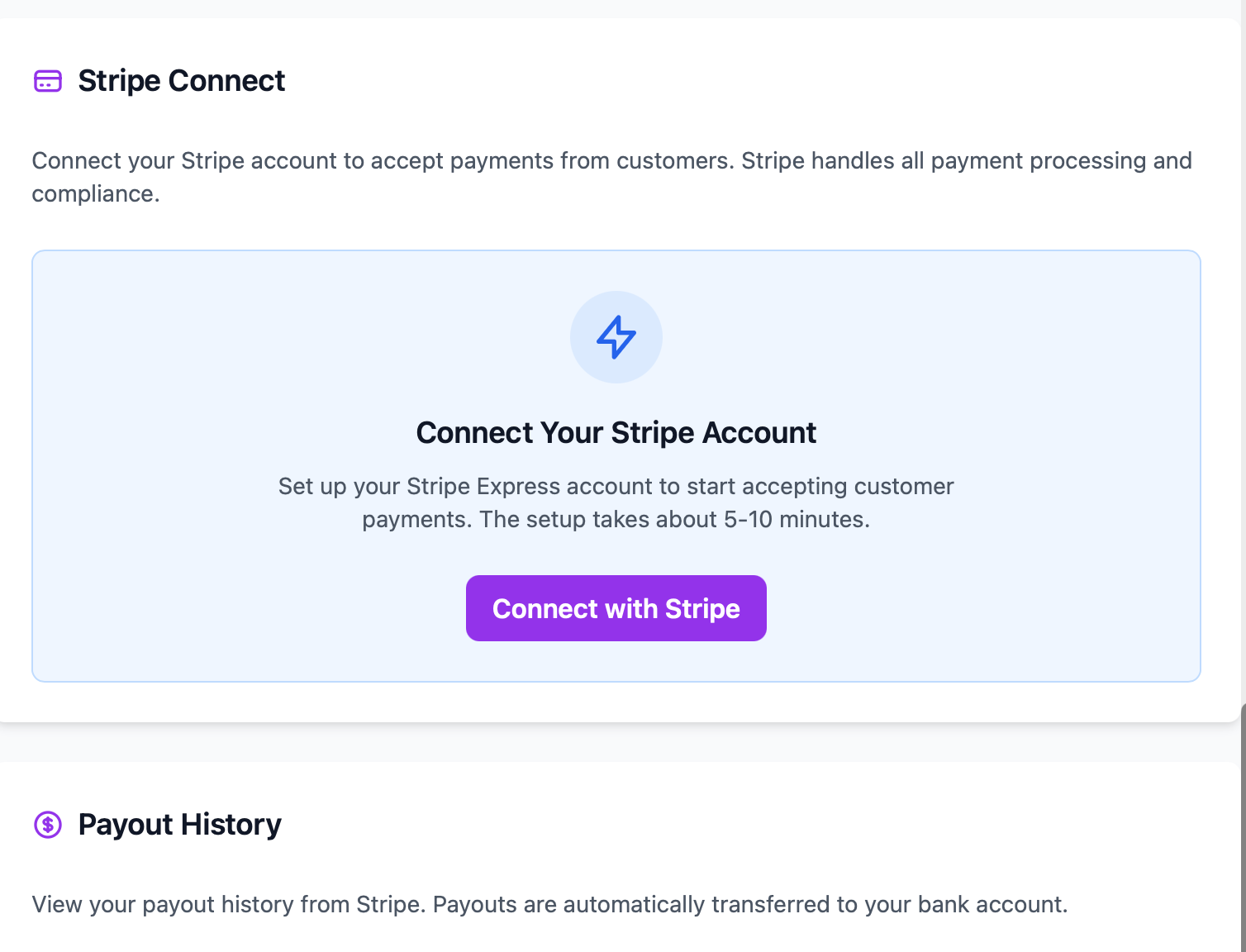
CharterSites Admin integrates payment processing through Stripe Connect—but not the way you might think.
Stripe Connect: Your Stripe Account, Your Money
Most booking platforms use standard Stripe integration, meaning payments go to the platform first, then get transferred to you later (minus their cut, minus Stripe's fees, minus mysterious "processing charges"). You're basically giving them free use of your money for days or weeks.
CharterSites uses Stripe Connect differently.
You create your own Stripe account (or link your existing one). When customers pay, the money goes directly into YOUR Stripe account, which deposits directly into YOUR bank account. Not held by the platform. Not sitting in escrow. Your money, immediately.
The platform earns its fee through Stripe's application fee system—a transparent, automated deduction at the time of payment. No surprises. No hidden holds. No waiting.
Payment Links: Modern, Secure, Mobile-Friendly
Here's how it works in practice:
- Create a booking in the system with all the details
- Generate a payment link for the deposit (or full amount)
- Send the link to your customer via email, text, or however you communicate
- Customer clicks the link and pays using Stripe's secure payment page
- Funds land in your account within 2 business days (or instantly with Stripe Instant Payouts)
- Booking automatically updates to show payment received
The payment link works on any device. Customers can pay with any major credit or debit card. They get immediate confirmation. You get immediate notification. The booking status updates automatically from "pending" to "confirmed" to "paid."
Flexible Payment Options
Deposits and Balances: Collect a 50% deposit when they book, then send a second payment link for the balance the week before the trip. Or require full payment upfront. Your choice, per booking.
Manual Payment Recording: Customer insists on paying cash at the dock? No problem. Record manual payments directly in the system with notes, payment method (cash, check, wire, other), and date. Full audit trail, even for offline payments.
Refund Processing: Occasionally you need to issue refunds (weather cancellations, customer emergencies). Admins can process full or partial refunds directly through the platform. Funds return to the customer's original payment method, and the booking status updates automatically.
Payment History Timeline
Every booking has a complete payment history showing:
- Date and time of each transaction
- Payment method (Stripe card, cash, check, etc.)
- Amount and payment type (deposit, balance, full payment)
- Transaction status (success, failed, refunded)
- Stripe payment intent IDs for reference
- Notes and reason codes for manual payments or refunds
Real-World Scenario
Sarah books a full-day charter for her husband's 50th birthday—six weeks out. You generate a payment link for the $300 deposit and text it to her. She pays from her phone while sitting in the pickup line at her kids' school. Thirty seconds later, you get a notification: "Deposit received for Booking #847." The $300 hits your Stripe account. Two days later, it's in your business checking account.
Four weeks later, you automatically send her the balance payment link ($600 for the remaining amount plus $50 for premium live bait she requested). She pays that evening. Money in your account before the trip even happens. No cash to handle. No checks to deposit. No awkward "can you Venmo me?" conversations at the dock.
And here's the best part: At the end of the year, your CPA loves you because every transaction is documented, categorized, and auditable.
Bottom line: Faster payment collection means better cash flow. Direct deposits mean you keep more of your money. Automated tracking means tax season doesn't make you want to throw your computer overboard. Charter operators report collecting payments 40% faster and reducing payment-related issues by 90%.
Review & Reputation Management: Your Online Reputation, Simplified
Google reviews can make or break a charter business. One spectacular trip turns into a 5-star review and three new bookings. One customer upset about rough seas leaves a 2-star review that costs you thousands in lost business.
But here's the problem: Most charter operators don't monitor their reviews consistently. They don't respond quickly. They miss opportunities to turn happy customers into public advocates. And they certainly don't have a system for encouraging reviews from satisfied customers.
CharterSites Admin connects directly to your Google Business Profile, bringing review management into your operational workflow.
Google Business Profile Integration
Through secure OAuth connection (you authorize the integration with your Google account), the platform automatically:
Syncs Your Google Reviews: All reviews from your Google Business Profile appear in your CharterSites admin panel. New reviews sync automatically. See star ratings, review text, customer names, and review dates—all in one place.
Centralized Response Management: Respond to reviews directly from the CharterSites interface. No need to log into Google, navigate multiple screens, or hunt for the review. Read it, type your response, click send. Your reply appears on Google within minutes.
Review Notifications: Get notified when new reviews come in. Respond quickly while the experience is fresh. Thank customers for great reviews within hours, not days. Address concerns before they escalate.
Internal Review Moderation
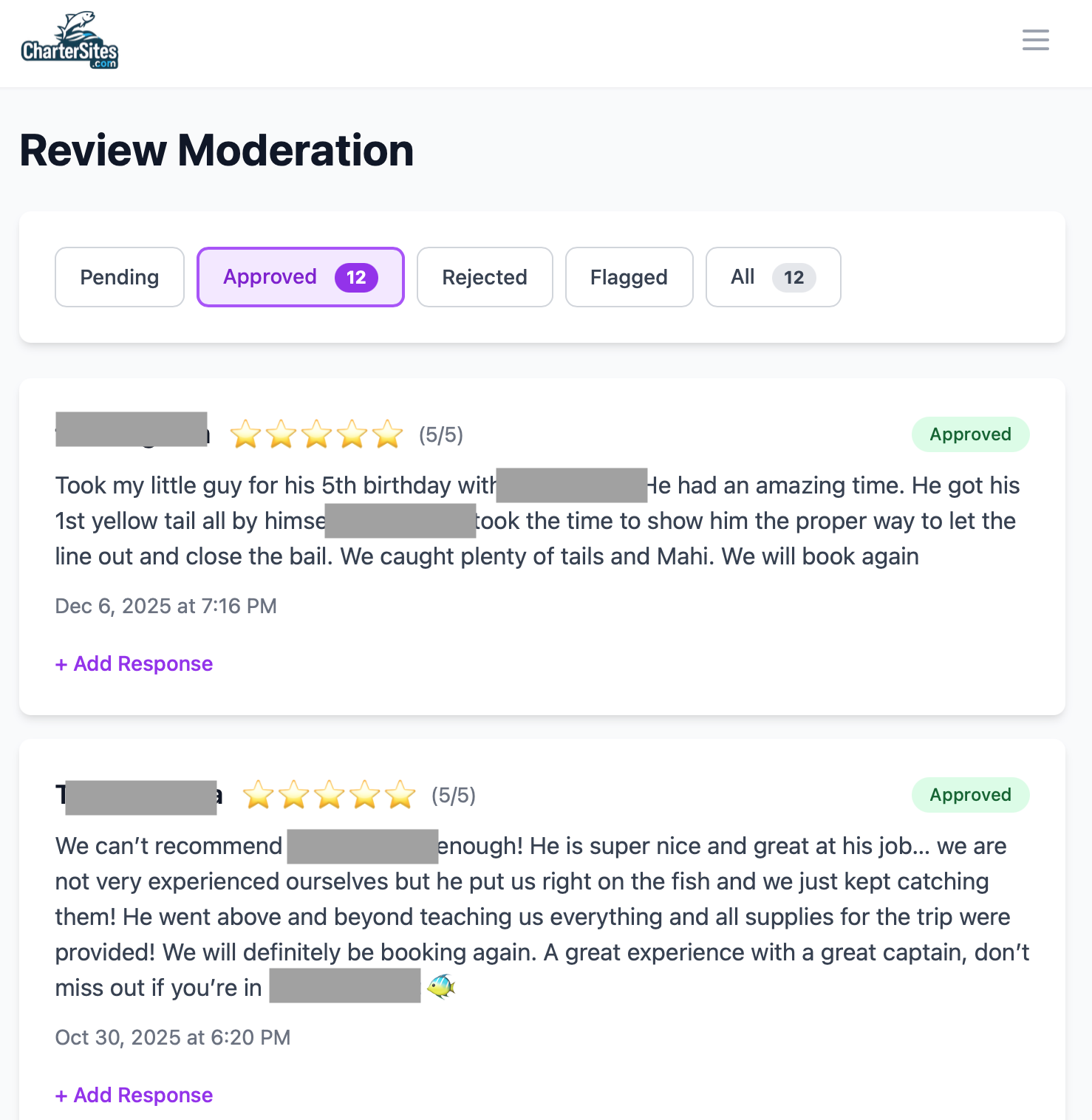
Beyond Google reviews, CharterSites includes an internal review system for managing customer testimonials on your own website:
Review Submission Workflow: Customers submit reviews through your website contact form. Reviews appear in your admin panel with "pending" status.
Approve, Reject, or Flag: Decide which reviews to publish on your website. Approve legitimate positive reviews. Reject spam or inappropriate content. Flag reviews that need attention or follow-up.
Testimonial Management: Approved reviews become testimonials you can feature on your website. Link reviews to specific services ("This review is about our sunset cruise"). Create a rotating feed of social proof.
Service-Specific Reviews: Track which services generate the most reviews and highest ratings. Use this data to promote your most popular offerings.
Review Link Generation
The platform generates a "Write a Review" link that takes customers directly to your Google Business Profile review page. Include this link in post-trip emails, text messages, or print it on your receipts. Make it effortless for happy customers to leave reviews.
Real-World Scenario
Saturday morning, you finish an incredible half-day trip. Everyone caught fish, the weather was perfect, and your clients were thrilled. Before they leave the dock, you hand them a business card with your Google review link QR code printed on it. "We'd love to hear about your experience!"
Tuesday morning, you open CharterSites and see three new 5-star Google reviews from that trip. You read each one, craft personalized thank-you responses mentioning specific details they mentioned, and publish your replies—all in under five minutes. Those reviews (with your professional responses) are now working for you 24/7, convincing potential customers that your operation is top-notch.
But you also notice a 3-star review from two weeks ago that you somehow missed. The customer had a great time but complained about the boat being smaller than expected. You respond immediately, apologize for the confusion, explain your boat specifications more clearly, and offer them a discount on their next trip. The customer sees your response, appreciates your professionalism, updates their review to 5 stars, and books again for next month.
Bottom line: Actively managing your online reputation turns happy customers into vocal advocates. Quick responses to negative reviews show professionalism and care. Charter operators with consistent review management report 25-35% more bookings from Google search.
Content Marketing Tools: Showcase Your Business Like a Pro
Your charter website needs fresh content. Blog posts about fishing techniques, seasonal updates, trip reports, and local fishing conditions. Photo galleries showcasing trophy catches, stunning sunsets, and happy customers. These aren't nice-to-haves—they're essential for SEO, social media, and converting website visitors into paying customers.
But creating content takes time you don't have. Writing blog posts. Editing photos. Uploading images. Organizing galleries. It's overwhelming.
CharterSites Admin includes powerful content management tools designed specifically for visual, story-driven businesses like yours.
Blog Content Management
WYSIWYG Editor: Write and format blog posts with a rich text editor. Add headings, bullet points, bold text, links, and images without knowing any code. What you see is what your customers will see.
Image Integration: Drag and drop photos directly into blog posts. Images are automatically optimized for fast loading and mobile displays.
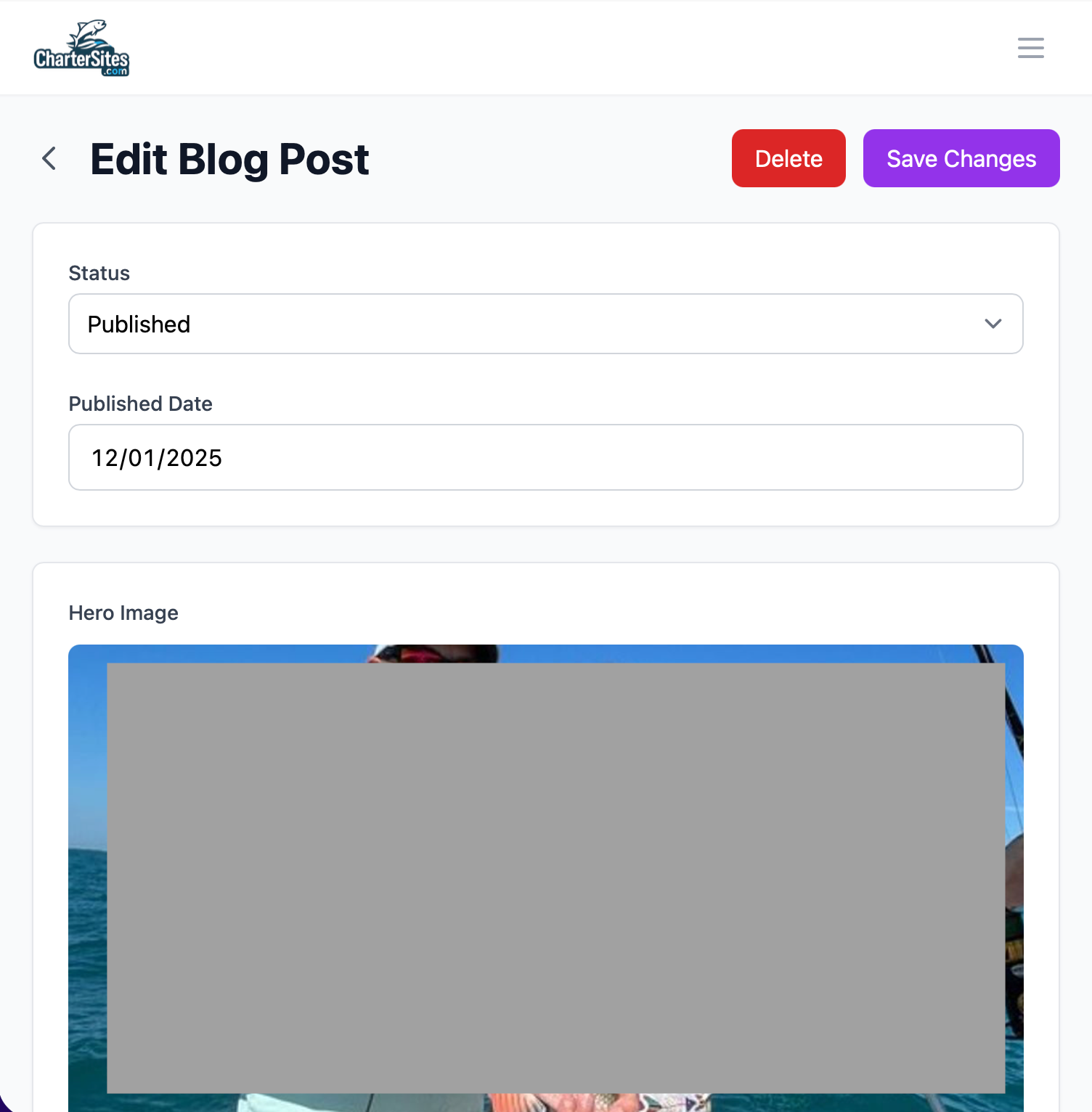
Post Scheduling: Write posts in advance and schedule them to publish automatically. Batch-create content during slow periods, then maintain a consistent publishing schedule during busy season.
Category Organization: Tag posts with categories (Fishing Reports, Tips & Techniques, Customer Stories, Local Events). Visitors can browse by topic.
SEO-Friendly: Each post has customizable title, meta description, and URL slug for search engine optimization. Rank higher on Google for local fishing searches.
Gallery Management
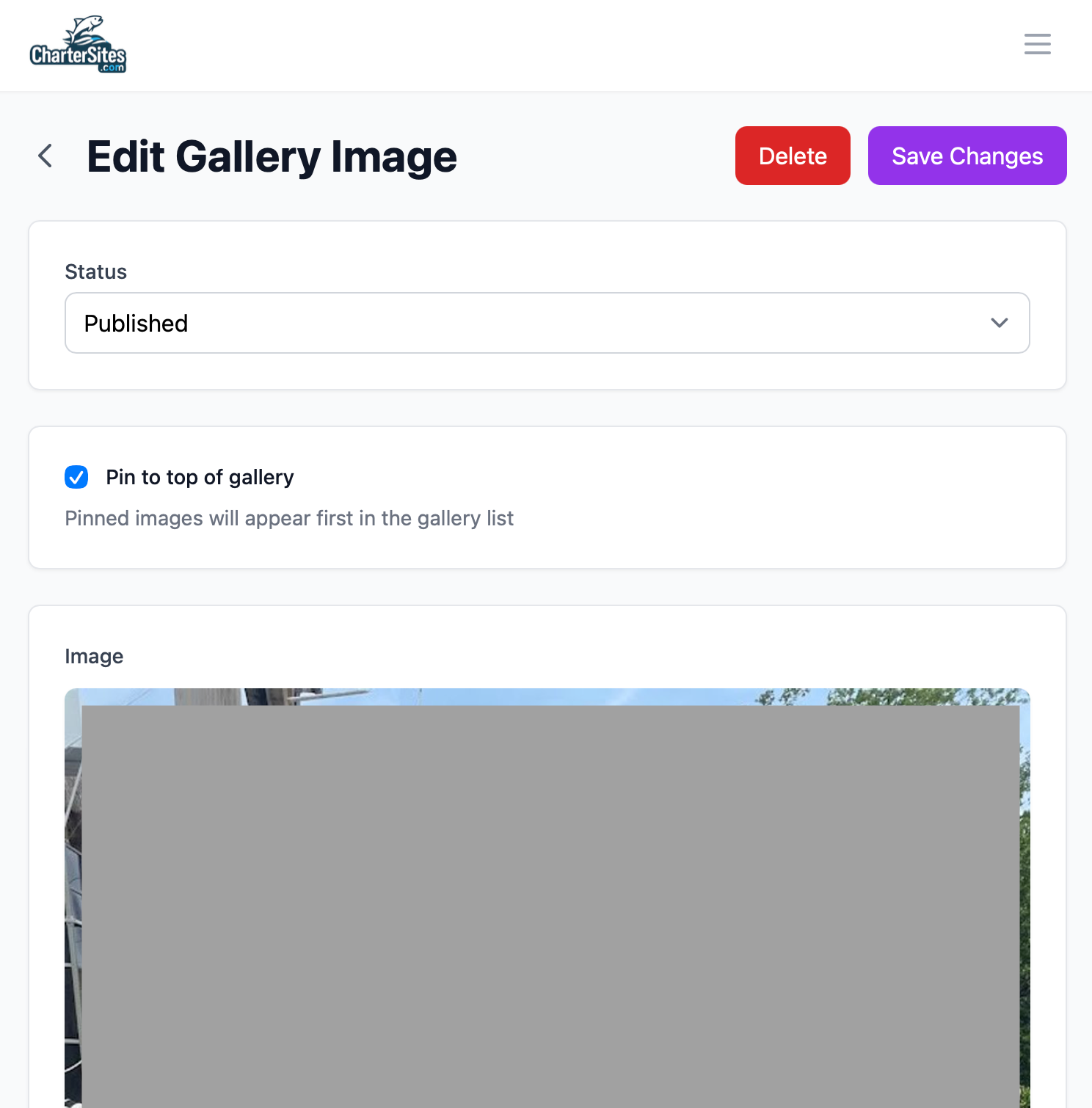
Photo Galleries: Create galleries for different categories—Trophy Catches, Sunset Cruises, Customer Memories, Boat Tours, Wildlife Sightings. Organize hundreds of photos without the chaos.
AI-Powered Image Upload: Here's where it gets impressive. Upload photos in bulk, and the system uses OpenAI's Vision API to automatically analyze each image and suggest titles, descriptions, and categories. It recognizes fish species, identifies sunset scenes, detects people in photos, and understands the context. You review the suggestions, make any adjustments, and save. What used to take hours now takes minutes.
Image Metadata: Each photo stores title, description, category, upload date, and custom tags. Search and filter by any criteria. Find "that great tarpon photo from last July" in seconds.
Gallery Display: Galleries integrate with your website, displaying photos in responsive, mobile-friendly layouts. Customers browsing your site on their phones see beautiful galleries that load quickly.
Real-World Scenario
It's January—the slow season. You decide to revamp your website content. You sit down with your laptop and 200 photos from last season. In the old world, this would take days of manually writing descriptions and organizing files.
With CharterSites, you upload all 200 photos to the gallery manager. The AI analyzes each image:
- "Angler holding a 30-pound mahi-mahi with ocean backdrop" → Tagged: Trophy Catch, Offshore Fishing, Mahi-Mahi
- "Vibrant sunset over calm waters with silhouetted boat" → Tagged: Sunset Cruise, Scenic
- "Family of four smiling on boat deck with fishing rods" → Tagged: Family Fishing, Customer Photos
You review the suggestions (95% are perfect), adjust a few descriptions, and approve. All 200 photos are organized, tagged, and ready to publish to your website galleries. Total time: 45 minutes instead of 8 hours.
Next, you write three blog posts: "Best Fishing Seasons in the Keys," "What to Bring on Your First Charter," and "Trophy Tarpon Caught Last Season." You add relevant photos from your newly organized gallery, schedule them to publish one week apart, and you're done. Your website now has fresh content publishing automatically while you're running trips.
Bottom line: Professional content marketing drives more website traffic, improves search rankings, and converts browsers into bookers. Charter operators with regularly updated blogs report 40% more organic search traffic.
Analytics & Business Intelligence: Know Your Numbers
"How's business?" used to be answered with a gut feeling. You knew roughly how many trips you'd done, had a vague sense of revenue, and assumed you were doing okay if the bills got paid.
But successful businesses run on data. Which services are most profitable? Which months need more marketing? Who are your best customers? What's your average booking value? Are deposits being collected on time? How's your year-over-year growth?
CharterSites Admin's dashboard gives you real-time business intelligence.
Dashboard Metrics
Total Revenue: See year-to-date revenue at a glance. Compare to previous periods. Track toward annual goals.
Booking Counts: Total bookings, broken down by status (pending, confirmed, paid, completed, cancelled). Understand your pipeline.
Upcoming Trips: How many bookings in the next 30 days? Next 7 days? Tomorrow? Never miss a trip.
Pending Reviews: How many customer reviews are waiting for your response? Stay on top of reputation management.
Active Contact Requests: How many new inquiries haven't been followed up yet? Don't let leads go cold.
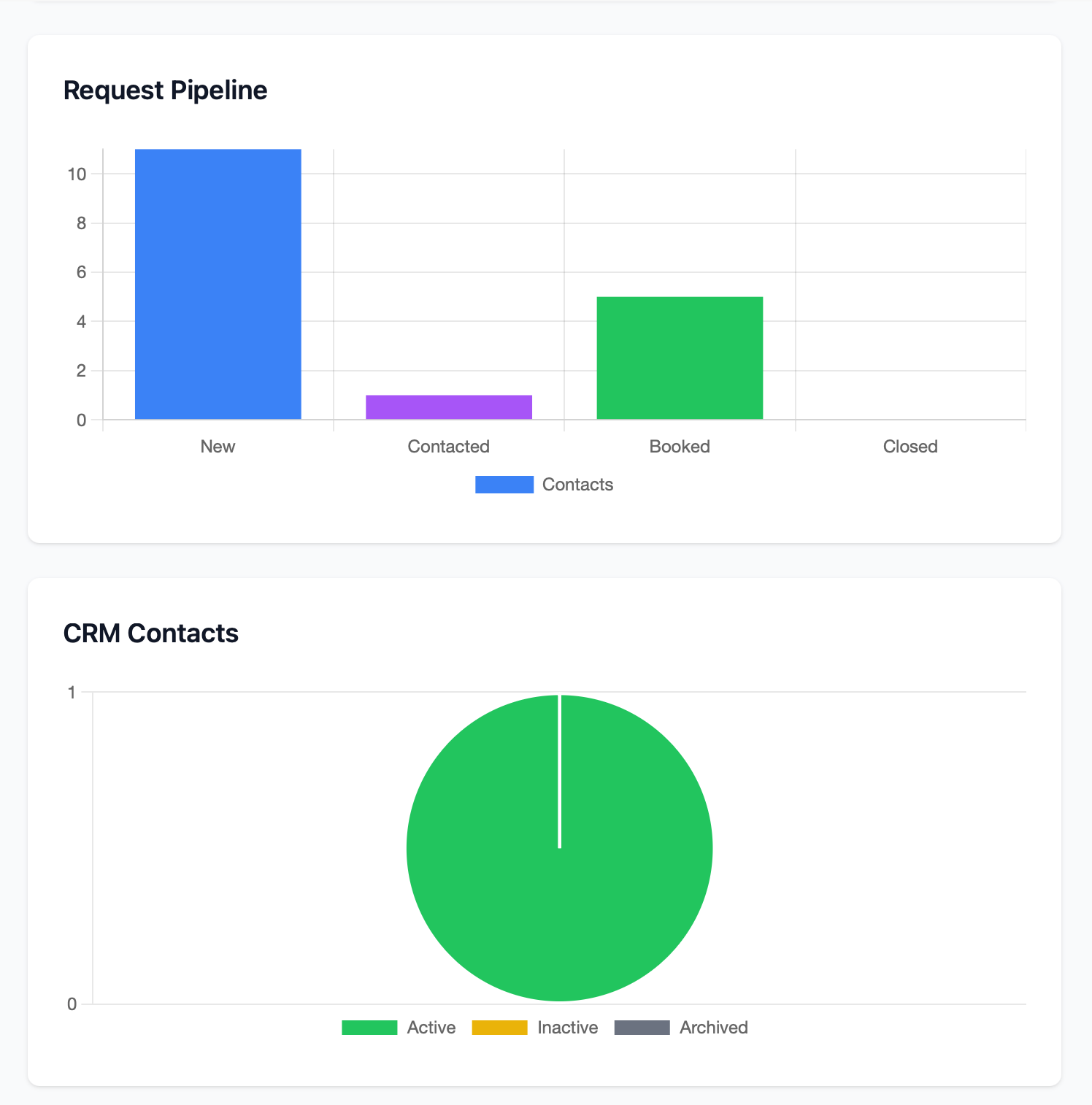
Visual Analytics
Revenue Trends: Line chart showing revenue over time. Spot seasonal patterns. Compare this year to last year.
Booking Status Breakdown: Pie chart showing distribution of pending, confirmed, and completed bookings. Identify bottlenecks (too many pending = need better deposit collection).
Review Status: Visualize your review pipeline. How many pending reviews? Approval rate? Response rate?
Contact Funnel: See how leads move through your pipeline—new inquiries, contacted, booked, no-response. Identify where leads drop off.
Customer Segmentation: Charts showing customer types, repeat vs. new customers, booking sources. Understand where your business comes from.
Real-World Scenario
You're applying for a business loan to upgrade your boat. The bank asks for revenue documentation, booking counts, customer numbers, and growth trends.
In the old system, you'd spend days reconstructing this data from spreadsheets, bank statements, and handwritten notes. With CharterSites, you open your dashboard, take screenshots of your analytics, and export a revenue report. Done in 10 minutes.
Or consider this: It's March, and you're planning your summer marketing budget. You pull up last year's booking data and notice June had surprisingly low bookings compared to May and July. You check the notes: heavy rain and storms last June. But this year's forecast looks clear. You increase your June marketing spend and run a "Summer Kickoff" promotion. Result: June bookings up 35% over last year.
Bottom line: Data-driven decisions beat gut feelings every time. Charter operators with good analytics report 20-30% better resource allocation and marketing ROI.
Security & Reliability: Enterprise-Grade Protection
You might be thinking: "This sounds great, but what about security? Is my data safe? What if the system goes down during peak season?"
Fair questions. Let's talk about how CharterSites Admin is built.
Multi-Tenant Architecture
Every charter's data is completely isolated from every other charter's data. Even though multiple businesses use the same platform, your customer information, bookings, financial data, and reviews are protected by multiple layers of security. It's architecturally impossible for one charter to access another charter's information.
Enterprise-Grade Authentication
User authentication is handled by an enterprise-level content management system. This isn't some homegrown login system. It's battle-tested, regularly updated, and used by thousands of businesses worldwide. Your users operate with their own permissions and access levels. You control who sees what.
Payment Security
All payment processing goes through Stripe, one of the most secure and trusted payment platforms in the world. CharterSites never stores credit card numbers or sensitive financial data. Everything is tokenized and encrypted. PCI compliance is handled by Stripe's infrastructure, not yours.
Data Encryption
All data transmitted between your browser and the servers is encrypted with industry-standard SSL/TLS. All passwords are hashed and salted. Sensitive data like Google OAuth tokens are encrypted at rest using AES-256-GCM encryption.
Rate Limiting & DDoS Protection
The platform includes built-in rate limiting to prevent abuse. General requests are limited to 200 per 15 minutes. Write operations (creating/updating data) are limited to 50 per 15 minutes. This prevents both malicious attacks and accidental self-inflicted damage from buggy scripts.
Automated Backups
Your data is automatically backed up daily. If something catastrophic happens, your data can be restored to any point in time within the retention period.
Modern, Reliable Technology
The entire platform is built with TypeScript, a strongly-typed programming language that catches bugs before they reach production. The backend runs on Node.js with Express. The frontend uses Vue 3. Everything is containerized with Docker for consistent, reliable deployments. This isn't held together with duct tape—it's professional-grade software engineering.
99.9% Uptime Target
The platform is designed for high availability. Services are monitored 24/7. If something breaks, automated alerts notify the engineering team immediately. Most outages are resolved before users even notice them.
Mobile Responsive
Access CharterSites from your desktop computer, laptop, tablet, or smartphone. The interface adapts to any screen size. Manage bookings from the dock. Respond to reviews from your phone. Check your dashboard from anywhere with internet.
Bottom line: You need reliability and security, especially when handling customer data and payments. CharterSites is built to enterprise standards, so you can focus on running trips instead of worrying about technology failures.
How It All Works Together: A Complete Customer Journey
Let's see how everything connects in a real-world example.
Monday Morning: Jenny is researching fishing charters in the Keys for her family vacation in August. She finds your website on Google (thanks to your SEO-optimized blog posts), browses your photo galleries (showing off your best catches), and reads glowing reviews from past customers (which you've been actively responding to).
She fills out your contact form: "Looking for a half-day family-friendly charter for 4 people, August 15th, morning preferred."
Monday Afternoon: You open CharterSites and see a new contact submission. You review Jenny's inquiry, see August 15th is available in your calendar, and click "Convert to Booking." The system automatically creates a CRM contact for Jenny (checking first that she's not already in your database) and opens a booking form pre-filled with her information.
You select your "Half-Day Family Reef Fishing" service, set the date and time, add a note about morning preference, calculate pricing (4 guests, no special requests), and set a 50% deposit. You save the booking with status "pending."
Monday Evening: You generate a payment link for Jenny's $250 deposit and email it to her with details about the trip, what to bring, and what to expect. "Click here to secure your reservation with a 50% deposit. The remaining balance ($250) is due one week before your trip."
Tuesday Morning: Jenny receives your email, clicks the payment link on her phone during her lunch break, and pays the deposit with her credit card. Within seconds, you get a notification: "Deposit received for Booking #982 - Jenny's Family Reef Trip." The booking status automatically updates to "confirmed." Jenny receives a confirmation email with booking details and the date when the balance is due.
August 8th (one week before trip): You send Jenny the balance payment link. She pays the remaining $250 that evening. Status updates to "paid." The booking appears on your calendar feed, syncing to your phone's calendar.
August 15th: You have an amazing trip. The kids catch their first-ever fish. Jenny's husband lands a beautiful grouper. Everyone has a blast. At the dock, you hand Jenny a card with your Google review QR code. "We'd love to hear about your experience!"
August 16th: Jenny leaves a glowing 5-star Google review: "Best charter we've ever been on! Captain was patient with the kids, found us great fishing spots, and made it a memorable experience. Highly recommend!" The review syncs to your CharterSites admin panel.
August 17th: You see Jenny's review, respond with a personalized thank-you message, and approve it for your website testimonials section. The review with your response now appears on your Google Business Profile and your website.
January (next year): You're planning a Valentine's Day promotion for couples. You filter your CRM for customers who left 5-star reviews and haven't booked yet this year. Jenny appears in the list. You send her a personalized email: "We loved having your family last summer! Bring your husband for a romantic sunset cruise this Valentine's Day - 20% off for returning customers."
January 20th: Jenny books the sunset cruise. The cycle continues.
This is the power of an integrated platform. Every piece works together. Data flows seamlessly between modules. Customer relationships deepen. Revenue grows. And you spend more time doing what you love—running great trips—instead of wrestling with administrative chaos.
Success Stories: Charter Operators Who've Made the Switch
CharterSites Admin currently powers operations for three successful charter businesses:
Charter Sites uses the platform to manage multiple captains and boats across various locations. The centralized booking system prevents double-bookings and ensures consistent customer service regardless of which captain takes the trip.
Marathon Fishing Kings leveraged the Google Business Profile integration to actively manage their online reputation. Within six months of implementing consistent review responses and gathering more customer testimonials, their Google ranking improved significantly, leading to a measurable increase in organic search bookings.
AGM Fishing Charters attributes their improved cash flow to the automated payment collection system. By sending deposit payment links immediately after booking and balance payment links one week before trips, they reduced payment chasing time by 90% and improved on-time payment rates dramatically.
These aren't massive corporate operations—they're businesses just like yours. Captains who were juggling spreadsheets, drowning in manual admin work, and missing revenue opportunities. They made the switch to CharterSites Admin and gained control of their operations.
Ready to Take Control of Your Charter Business?
If you've read this far, you're probably thinking one of two things:
- "This sounds amazing, but is it too complicated for someone like me?"
- "This sounds expensive—can I afford it?"
Let's address both.
"Is it too complicated?"
CharterSites Admin is designed for charter boat captains, not IT experts. The interface is intuitive. Common tasks take just a few clicks. There's no steep learning curve. Most operators are fully comfortable with the platform within a few hours of use.
And if you ever get stuck, you have access to comprehensive documentation and dedicated support. We're here to help you succeed.
"Can I afford it?"
Think about the cost of the chaos you're living with now:
- How many hours per week do you spend on administrative tasks instead of running trips?
- How much revenue are you losing to missed follow-ups and slow payment collection?
- What's the cost of negative reviews you never saw or responded to?
- How many potential customers can't find you because your website content is outdated?
Most charter operators find that CharterSites Admin pays for itself within the first month—just from time saved and improved payment collection alone. And the long-term benefits (better customer retention, improved reputation, data-driven decisions) compound month after month.
Next Steps
CharterSites Admin is currently available to a limited number of charter operations. We intentionally keep our customer base manageable so we can provide excellent support and continue building features that charter operators actually need.
Here's how to get started:
-
Request a Demo: See the platform in action with a personalized walkthrough tailored to your specific operation.
-
Free Consultation: Talk with our team about your current challenges and how CharterSites Admin can address them.
-
Customized Onboarding: If it's a good fit, we'll help you migrate your existing customer data (from spreadsheets or other systems) and set up your account.
-
Launch with Support: Go live with hands-on support from our team. We'll make sure you're comfortable with the platform before you're on your own.
Ready to stop juggling spreadsheets and start running your charter business like the professional operation it deserves to be?
Contact us today to schedule your demo. Your future self—the one sleeping better, making more money, and spending more time on the water—will thank you.
Frequently Asked Questions
Q: Do I need to be tech-savvy to use CharterSites Admin?
A: Not at all. The platform is designed for boat captains, not computer programmers. If you can use email and browse websites, you can use CharterSites. And we provide training and support to get you up to speed quickly.
Q: What happens to my existing customer data?
A: We can help you import your existing customer list from spreadsheets or other systems. Or you can start fresh and build your database as bookings come in. Your choice.
Q: Do I need to change my Stripe account or payment processor?
A: You'll create a Stripe account (or connect your existing one) using Stripe Connect. This keeps your payment processing under your control. You own the Stripe account, not us. Money goes directly to your bank account.
Q: What if the system goes down during peak season?
A: The platform is built for 99.9% uptime with enterprise-grade infrastructure. Downtime is extremely rare, and most issues are resolved within minutes. Your data is backed up continuously, so nothing is ever lost.
Q: Is my data safe and private?
A: Yes. Multi-tenant architecture ensures your data is completely isolated from other charter operations. All connections are encrypted. Payment data is handled by Stripe's secure infrastructure. No other charter can access your information.
Q: Can I access it from my phone?
A: Absolutely. CharterSites Admin is fully responsive and works on any device—desktop, laptop, tablet, or smartphone. Manage bookings from the dock, respond to reviews from your phone, check your dashboard from anywhere.
Q: What kind of support do you offer?
A: We provide comprehensive documentation, video tutorials, and direct support from our team. If you get stuck or have questions, we're here to help.
Q: Can I try it before committing?
A: Yes, we offer demos and consultations to make sure CharterSites Admin is the right fit for your operation before you make any commitment.
Stop juggling disconnected tools. Stop losing revenue to missed follow-ups and slow payment collection. Stop spending your evenings doing admin work instead of enjoying time with your family.
Your charter business deserves a better system. CharterSites Admin is that system.
Request your demo today.